Atšķirības starp "Translations:E-mail password/4/en" versijām

No ''Hostnet Wiki''
Pārlēkt uz: navigācija, meklēt
(Jauna lapa: #Go to Your webmail account: '''mail.domain.com''' or '''webmail.domain.com'''. #Log in to your email account. # #:1) Click on your email to open menu. #:2) Choose '''"Password & Se...)
 
(Nav atšķirību)

Pašreizējā versija, 2017. gada 23. maijs, plkst. 08.52

Informācija par ziņojumu (contribute)
This message has no documentation. If you know where or how this message is used, you can help other translators by adding documentation to this message.
Message definition (E-mail password)
#Ejiet uz Jūsu webmail kontu, rakstot '''mail.domēns.lv''' vai '''webmail.domēns.lv'''.
#Pieslēdzieties kontam ar savām epasta pieejām.
#
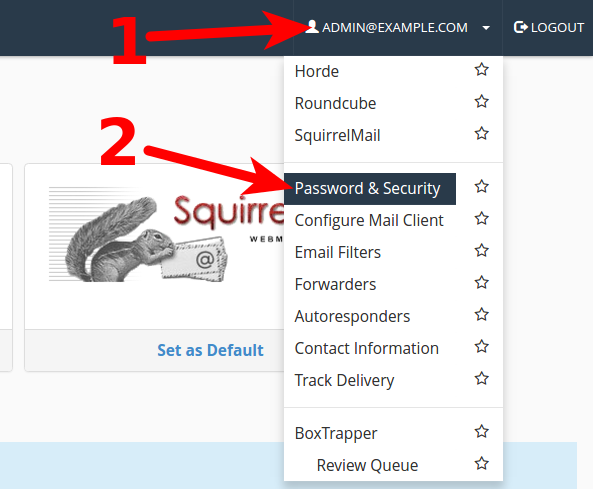
#:1) uzspiediet uz sava epasta adreses, lai atvērtu izvēlni. 
#:2) Izvēlieties '''"Password & Security"'''
#:[[Attēls:pass1.png]]
#
#:1) Jaunajā logā pie '''New password''' ievadiet jauno paroli. 
#:2) Logā pie '''Confirm New Password''' ievadiet atkārtotu jauno paroli. 
#:3) Nospiediet pogu '''Save''', lai saglabātu jauno paroli.
#:[[Attēls:pass2.png]]
Tulkojums#Go to Your webmail account:  '''mail.domain.com''' or '''webmail.domain.com'''.
#Log in to your email account.
#
#:1) Click on your email to open menu. 
#:2) Choose '''"Password & Security"'''
#:[[Attēls:pass1.png]]
#
#:1) In area: '''New password''' type new password. 
#:2) In next arrea: '''Confirm New Password''' type new password once again. 
#:3) Click on '''Save''', to save new password.
#:[[Attēls:pass2.png]]
  1. Go to Your webmail account: mail.domain.com or webmail.domain.com.
  2. Log in to your email account.
  3. 1) Click on your email to open menu.
    2) Choose "Password & Security"
    Pass1.png
  4. 1) In area: New password type new password.
    2) In next arrea: Confirm New Password type new password once again.
    3) Click on Save, to save new password.
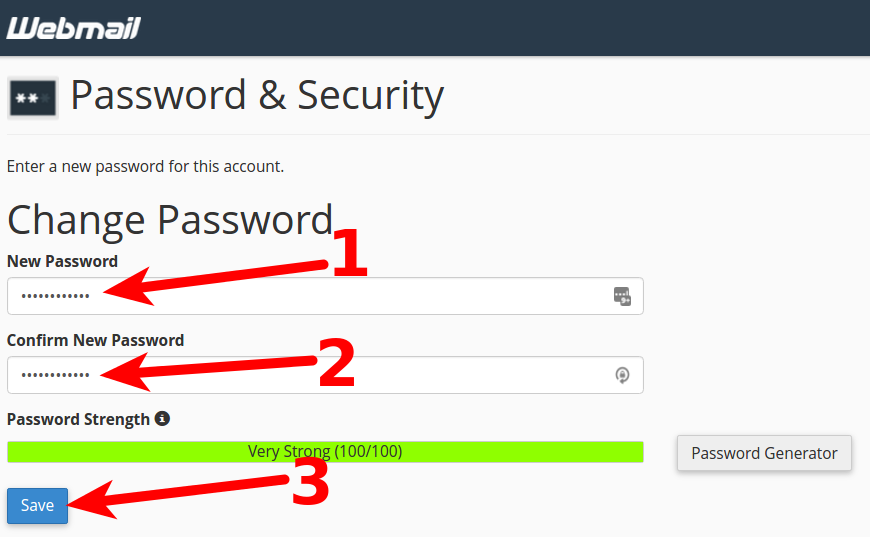
    Pass2.png