Atšķirības starp "E-mail password/en" versijām
No ''Hostnet Wiki''
(Updating to match new version of source page) |
(Jauna lapa: == '''How can e-mail user change e-mail password?''' ==) |
||
| 12. rindiņa: | 12. rindiņa: | ||
[[Attēls:Region capture 6.png]] | [[Attēls:Region capture 6.png]] | ||
| − | == ''' | + | == '''How can e-mail user change e-mail password?''' == |
Versija, kas saglabāta 2017. gada 23. maijs, plkst. 08.46
Kā administrators var nomainīt e-pasta paroli?
- Log in to cPanel using the link http://domain.com:2083 (where domain.com is your domain name).
- After logging in, find the section Email and click the Accounts.
- Next to the e-mail address, click Change Password.
- Type the desired password. For your and other customers'safety, we recommend you to include in the pasword capital letters, lower case letters, symbols and numbers. With the proposed tool you can generate the password which is harder to guess.
- Confirm the change of the password by clicking Change Password.

How can e-mail user change e-mail password?
- Ejiet uz Jūsu webmail kontu, rakstot mail.domēns.lv vai webmail.domēns.lv.
- Pieslēdzieties kontam ar savām epasta pieejām.
-
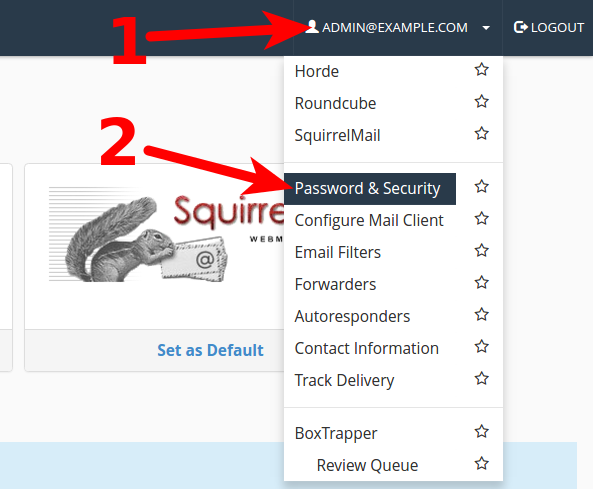
- 1) uzspiediet uz sava epasta adreses, lai atvērtu izvēlni.
- 2) Izvēlieties "Password & Security"
-
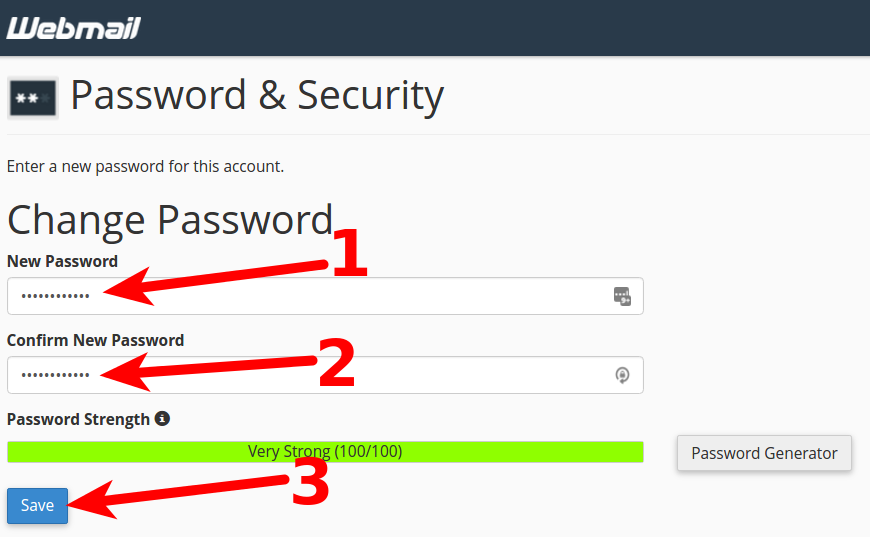
- 1) Jaunajā logā pie New password ievadiet jauno paroli.
- 2) Logā pie Confirm New Password ievadiet atkārtotu jauno paroli.
- 3) Nospiediet pogu Save, lai saglabātu jauno paroli.